Graph View project
Gramps Graph View Profiles - Workflow
From a saved Graph View profile in Gramps to a finished PDF and browser viewing with PDF.js.
From Graph View profile to published PDF
From Gramps to PDF
First, I load the required View profile in Graph View.
I then select
Print…
and open the generated
.svg
file in LibreOffice Draw. The drawing should now look the same as it did in Gramps.
If needed, I add a small legend explaining the colours used for person tags.
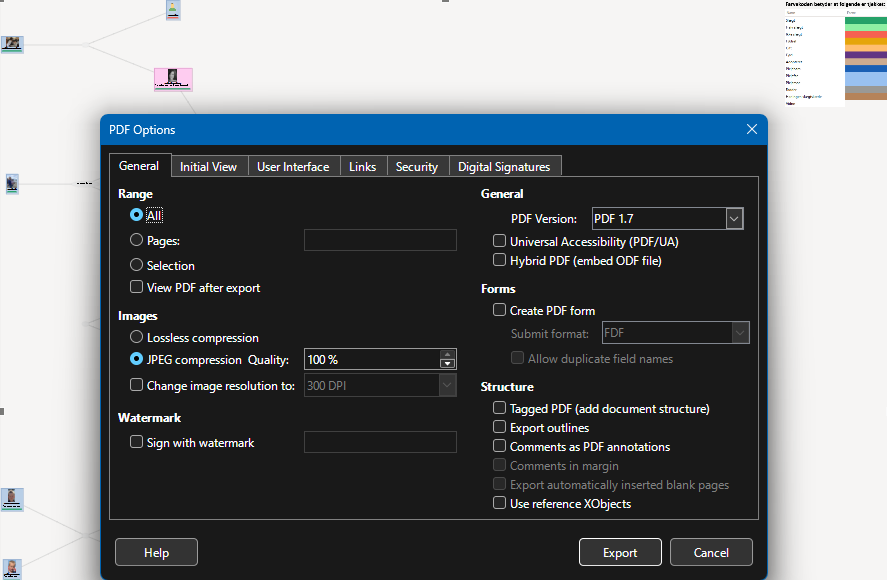
Next, I choose Export as PDF… . The LibreOffice Draw settings I use are shown in the screenshot.
The result is a finished PDF file that can be viewed, shared or published online.
From PDF to the website
I use PDF.js to display my PDF files on the website. The current PDF.js version is stored on my own server, which allows me to adjust the viewer settings.
Each PDF is opened from its own HTML page, which links to the PDF.js viewer. Visitors can view the PDF directly in the browser or download it to their own device.
LibreOffice Draw settings
General: Range = All; JPEG compression quality = 100%; Change image resolution = unchecked; PDF version = PDF 1.7; all Structure options unchecked.
Initial View: Page only; Magnification = Fit width.