GRAMPS FIX
Gramps Add Media Path Fix
Open the Add Media dialog in the media base path configured for the active family tree.
Overview
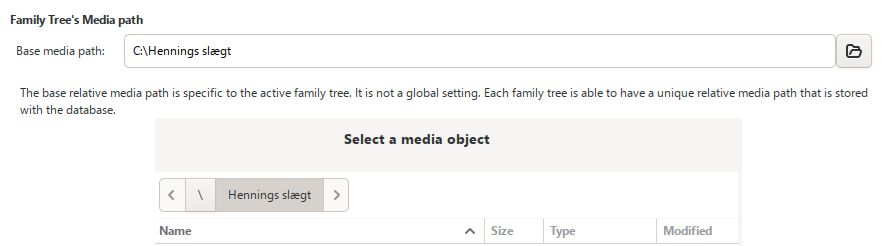
When a new media object is added in Gramps, the Add Media dialog may open in the last folder used by another family tree instead of the media base path configured for the currently active family tree.
This happens because the dialog normally uses the globally stored directory from
behavior.addmedia-image-dir
. That value is shared through
gramps.ini
, while each family tree can have its own media base path stored with the database.
The result can be unnecessary navigation and an increased risk of selecting media files from the wrong folder.
Proposed fix
The following small change makes the Add Media dialog use the active family tree’s media base path first. If that folder is missing or invalid, Gramps keeps its existing fallback behavior and uses the globally stored Add Media directory.
Find this line in
addmedia.py
self.last_directory = config.get("behavior.addmedia-image-dir")Replace it with
mpath = self.dbase.get_mediapath()

if mpath and os.path.isdir(os.path.abspath(mpath)):
    self.last_directory = os.path.abspath(mpath)
else:
    self.last_directory = config.get("behavior.addmedia-image-dir")
Installation
- Close the active family tree and exit Gramps completely.
-
Open the Gramps editors folder. For a standard Gramps 6.0.8 installation on Windows, it is normally:
C:\Program Files\GrampsAIO64-6.0.8\gramps\gui\editors -
Find
addmedia.py. -
Make a backup copy and rename the copy to
addmedia.py.bak. -
Open the original
addmedia.pyin a text editor. - Apply the replacement shown above and save the file.
- Start Gramps again and open a family tree.
Administrator permission may be required because the file is located under
C:\Program Files
.
Result
- The Add Media dialog opens in the media base path configured for the active family tree.
- Switching between family trees with different media paths works more consistently.
- The original global Add Media directory remains available as a fallback.
Tested
Confirmed with Gramps 6.0.8 on Windows 11 across multiple family trees using different media base paths.
Submitted to Gramps
This improvement has been submitted to the Gramps Bug Tracker under the username mars1962 .
Important notes
This is a manual modification of a Gramps program file. A Gramps update or reinstallation may replace
addmedia.py
and remove the change.
After updating Gramps, check whether the fix is still needed before applying it again. Do not copy an older complete
addmedia.py
into a newer Gramps version; apply only the small code change unless the exact versions match.
Disclaimer
This modification is an unofficial fix and is not affiliated with or endorsed by the Gramps Project. Keep a backup of the original file and use the change at your own risk.