Graph View project
Gramps Graph View Profiles - Profiles
Standard profiles for general Graph View settings and View profiles for specific people and saved viewing setups.
Standard and View profiles
Standard profile
Each family tree can have one Standard profile. Its name is determined automatically by the family tree.
A Standard profile does not change the home person. When it is loaded, the active person is set to the home person.
A Standard profile can be created in two ways:
- Save as Standard profile saves the settings used by the current view. The included settings are then shown in the profile options.
- Save standard profile saves only the settings that have been selected manually for inclusion.
Standard profiles are stored in the
GraphView/profiles
folder.
View profiles
Any number of named View profiles can be created with Save as... .
A View profile may include both the home person and the active person. This makes it possible to restore a view that displays the path between them.
View profiles are stored in the
base media
folder.
As a result, the same profile names can be used independently in
different family trees.
Shared behaviour
- Only profiles belonging to the current family tree can be loaded.
- Each JSON file records the base media path, family-tree name and database name.
- Zoom & chart position stores both the zoom level and the position of the graph.
- Apply at startup saves the selected startup option for the next time the family tree is opened.
- Use profiles temporarily restores the settings that were active when the current family tree was opened. Those restored settings are therefore the ones carried into the next family tree that is opened.
- Show people with the person tag “ProfileTag” is available from both the Layout tab and the right-click menu.
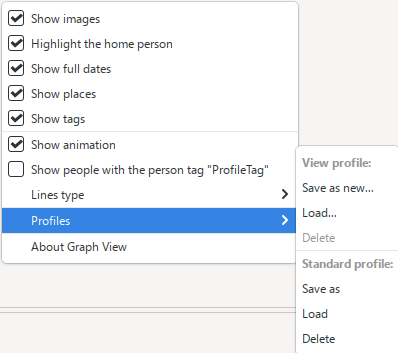
- A new Profiles submenu provides quick access from the Graph View right-click menu.
-
No profile settings are stored in
Gramps.ini.
Before a profile is loaded, Gramps Graph View Profiles checks that it belongs to the current family tree and that its saved people, tags and settings are still valid. See Notes for the complete list of checks.