Gramps export plugin
Gramps 6.0 JSON Export for Gramps 5.1 / 5.2
Export a Gramps 6.0 family tree to JSON that can be imported into Gramps 5.1 or 5.2, with tested compatibility adjustments and a conversion report.
Why this plugin exists
I test my own Gramps plugins in versions 5.1, 5.2 and 6.0. For that work I wanted to reuse the same small family test tree with 187 people in all three versions.
GEDCOM export was useful, but too much information needed for testing was lost. The existing JSON export and import route came closest, so this project grew from testing how much of the Gramps 6.0 data could be converted safely for the older JSON Import addons.
The result is a normal Gramps 6.0 export option that performs the tested conversion automatically.
What it does
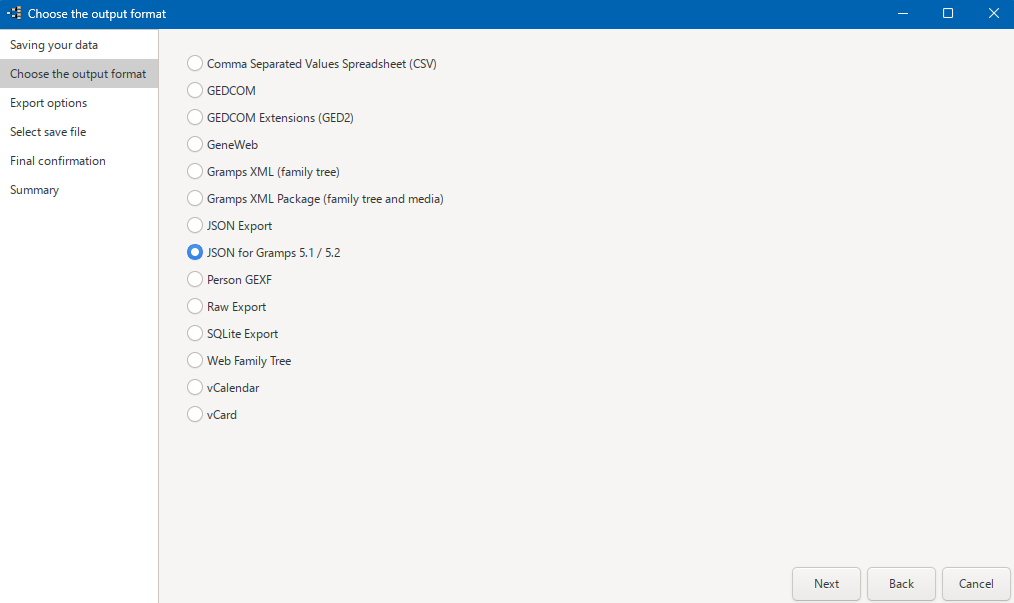
- Runs from the normal Gramps 6.0 export assistant as JSON for Gramps 5.1 / 5.2 .
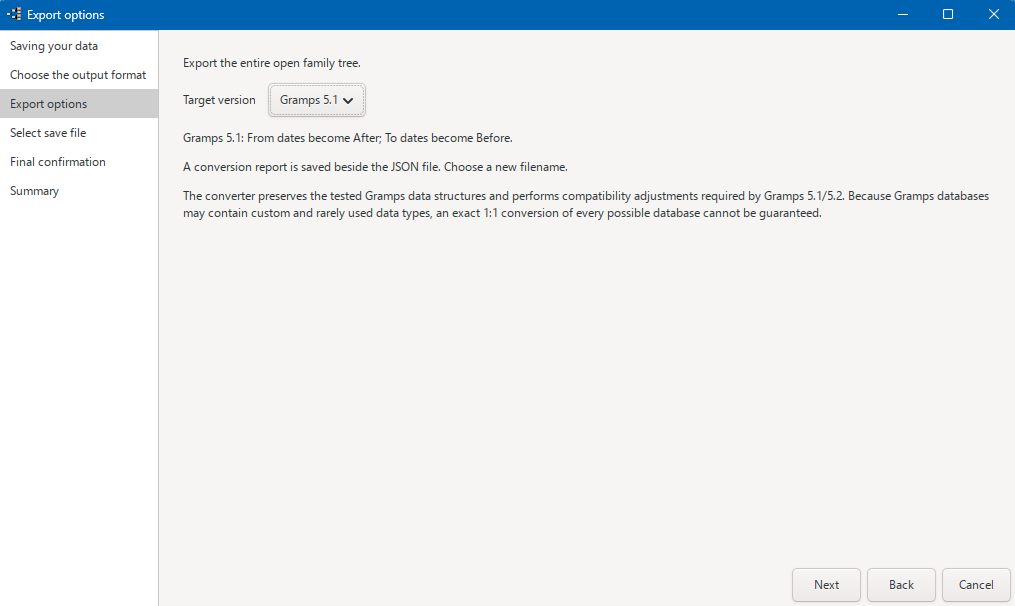
- Lets you choose Gramps 5.1 or Gramps 5.2 as the target version.
- Exports the complete open family tree to temporary JSONL, applies the compatibility conversion and writes the final JSON file.
-
Creates one English
.report.mdfile with record and type counts, conversion actions, checks, SHA-256 information and conversion scope. - Removes the temporary JSONL file automatically when the export finishes successfully.
- Provides Danish or English interface text according to the Gramps language setting. Data from the family tree keeps its original language.
Data included
The exporter reads the entire open family tree, including private records, without using person filters. The ten primary Gramps record categories are included:
Note, Event, Person, Family, Repository, Place, Source, Citation, Media and Tag.
Media records and media references are included, but the image, audio, video and other media files themselves are not copied. This exporter is therefore not a complete portable backup of a Gramps installation.
Compatibility handling
The conversion actively handles eleven Gramps type classes that were checked for differences between the versions:
EventRoleType,
EventType,
NameType,
NameOriginType,
PlaceType,
FamilyRelType,
ChildRefType,
NoteType,
UrlType,
RepositoryType
and
SourceMediaType.
Supported standard types remain standard types in the selected target version. Custom types keep their text names. Gramps 6 standard values that do not exist in the target are preserved as custom text instead of being written as unsupported numeric values.
Gramps 5.1 does not support the Gramps 6 From and To date modifiers. For a 5.1 export they are approximated as After and Before respectively, and the affected dates are listed in the report. Gramps 5.2 keeps From and To unchanged.
Tested scope and limitations
The conversion scripts were tested with Danish and English Gramps 5.1 and 5.2. The integrated exporter was then tested by exporting from Gramps 6.0 and importing into both target versions without observed discrepancies in the tested data.
The larger test tree contains
2,208 people
, and additional manual test data was used for
RepositoryType
and
SourceMediaType.
Important: this is a tested compatibility conversion, not a guarantee of an exact 1:1 copy for every possible Gramps database. Custom and rarely used data types may exist outside the tested scope.
Requirements
- Gramps 6.0.x to run the exporter.
- No separate JSON Export addon is required in Gramps 6.0; the exporter uses the JSON serialization functions included in Gramps itself.
- The matching JSON Import addon must be installed in the receiving Gramps 5.1 or 5.2 installation.
- The exporter is registered for the Gramps 6.0 release series. Other release series are rejected by the Gramps version check.
Installation
- Close Gramps.
- Extract the downloaded ZIP archive.
-
Copy or extract the project folder into your Gramps user plugin folder.
Keep the complete folder structure unchanged, including thelocalefolder.
The user plugin folder is normally located here:
- Windows:%AppData%\gramps\gramps(version)\plugins\
- Linux:~/.gramps/gramps(version)/plugins/
- macOS:~/Library/Application Support/gramps/gramps(version)/plugins/
Replace(version)with the Gramps version folder used on your system. - Start Gramps again.
- Open the People category and choose Easy Filter Builder from the available People views.
If the view does not appear or fails to load, check Help → Plugin Manager for an error message.
Removing the test version
- Close Gramps.
- Delete the project folder that you added to the Gramps user plugin folder.
- Start Gramps again.
Use
- Open the family tree in Gramps 6.0.
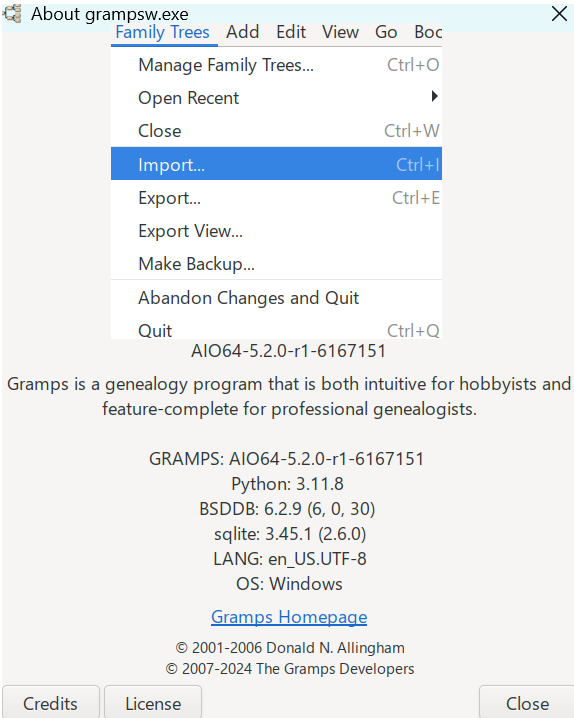
- Select Family Trees → Export... .
- Choose JSON for Gramps 5.1 / 5.2 .
- Select Gramps 5.1 or Gramps 5.2 under Target version .
-
Choose a new
.jsonfilename and complete the export assistant. - Import the JSON file into a separate family tree in the selected target version using its JSON Import addon.
Existing output and report files are deliberately refused. Choose a new filename for each export instead of overwriting an earlier conversion.
Version 1.0.0
Version 1.0.0 is the stable local release for Gramps 6.0.x with output for Gramps 5.1 and Gramps 5.2. It includes the Danish interface translation and one English conversion report per export.
License: GNU General Public License v2 or later , like Gramps.
Download and documentation
The download package contains the exporter, both target-version converters, Danish translation files, README and release notes.